

Download WinZip Command Line Support Add-On (32-bit) – command line, automation, batch processing, compression, zip, security zone, PPMd, bzip2, WinZip Pro, 32-bit
Overview
The WinZip Command Line Support Add-On (32-bit) is a specialized utility developed for licensed users of WinZip Pro, designed to extend the functionality of the core application through a command-line interface. This add-on enables users to execute file compression and extraction tasks directly from the command prompt, eliminating the need for graphical interaction. Its primary purpose is to support automation, batch processing, and advanced compression workflows, making it a valuable tool for system administrators, developers, and IT professionals who manage large volumes of archive files.
By providing programmatic access to WinZip’s capabilities, the add-on helps solve the problem of repetitive manual operations, reducing human error and increasing operational efficiency. Target users include technical professionals who rely on scripting and automation in their daily workflows. The developer, WinZip Computing, is a recognized name in file compression software, known for its robust tools and long-standing presence in the productivity space.
While specific use cases are not detailed in the provided information, real-world applications include automated backups, deployment scripts, and integration into build systems. In the broader app ecosystem, this add-on fills a niche for power users who require precision, speed, and integration with existing command-line environments.
Key Features & Functionality
- Command-Line Interface: Provides direct access to WinZip’s core features via the command prompt, enabling users to run compression and extraction tasks without launching the GUI.
- Automation and Batch Processing: Supports integration with BAT files and script languages, allowing users to create automated workflows for recurring tasks like daily backups or file archiving.
- Extensive Command-Line Options: Offers a wide range of parameters to fine-tune compression behavior, file inclusion, password protection, and output settings for precise control.
- Enhanced Compression Methods: Version 2.0 introduces PPMd and bzip2 compression algorithms within the ZIP format, delivering higher compression ratios for certain file types, especially text and log files.
- Security Zone Support: Compatible with Windows XP SP2’s Attachment Management feature, allowing users to extract files with or without security zone metadata, enhancing control over file trust levels.
These features translate into tangible benefits: system administrators can schedule nightly archive jobs using scripts, developers can include file compression in CI/CD pipelines, and enterprise users can standardize archive creation across departments. The add-on’s focus on precision and automation makes it a powerful complement to WinZip Pro, particularly in environments where consistency and scalability are critical.
Interface, UX & Performance
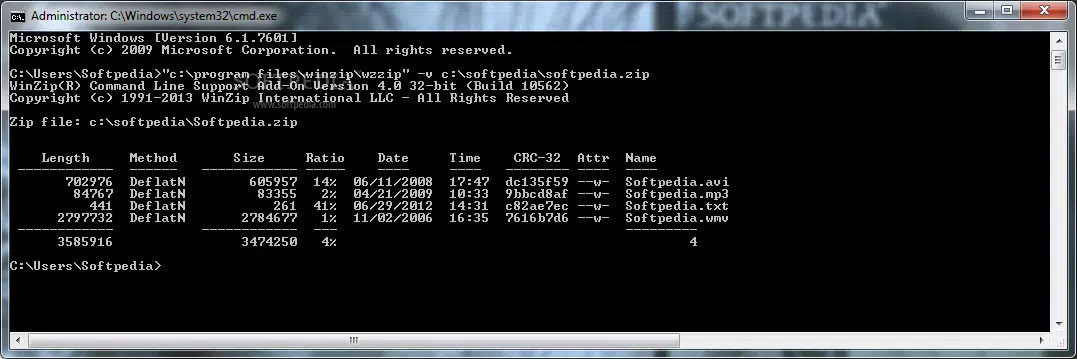
The WinZip Command Line Support Add-On (32-bit) operates entirely through text-based input and output, meaning its interface is inherently minimal and focused on functionality rather than visual design. Users interact with the tool via the command prompt, relying on command syntax and parameter flags to execute tasks. The navigation flow is linear and predictable, following standard command-line conventions.
There is no graphical layout to navigate, which reduces cognitive load for experienced users but may present a learning curve for beginners. The tool is designed for efficiency, with fast execution times and low memory overhead, which is typical for command-line utilities. Although the developer did not list formal performance metrics, its small file size of 1.2 MB suggests a lightweight footprint.
Responsiveness is expected to be high, as command-line tools generally consume minimal system resources. Stability is likely robust, given the developer’s established track record with WinZip Pro. However, specific compatibility with older Windows environments or hardware configurations was not disclosed.
Platform Compatibility & Technical Requirements
The WinZip Command Line Support Add-On (32-bit) is designed for the Windows platform and is compatible with 32-bit systems. The software version is 2.0, released on April 15, 2024. The file size is 1.2 MB, indicating a compact and lightweight installation.
The developer did not specify minimum OS requirements, nor did they list compatibility details for specific Windows versions beyond the platform designation. Users should verify that their system meets the prerequisites of WinZip Pro, as this add-on is only available to licensed users. No additional hardware or software dependencies were mentioned.
The lack of detailed system requirements means users should exercise caution when deploying on legacy or specialized environments. The absence of information on updates or future support cycles was also not provided.
Pros and Cons
Pros
- Enables automation of file compression tasks via scripts and batch files.
- Provides access to advanced compression methods like PPMd and bzip2.
- Supports security zone handling for enhanced file trust management.
- Small file size (1.2 MB) ensures minimal disk usage.
- Designed for power users and technical professionals who prefer command-line workflows.
Cons
- Only available to licensed WinZip Pro users, limiting accessibility.
- Requires technical knowledge of command-line syntax and scripting.
- No graphical interface, which may deter non-technical users.
- Compatibility with specific Windows versions was not disclosed.
- File size and version details are minimal; no detailed documentation was provided.
FAQ
Is the WinZip Command Line Support Add-On free to use?
Yes, the add-on is available at no cost. However, it is only accessible to users who hold a valid license for WinZip Pro.
Can I use this add-on on 64-bit Windows systems?
The add-on is specifically designed for 32-bit systems. Compatibility with 64-bit Windows environments was not confirmed by the developer.
What scripting languages can I integrate this tool with?
The add-on supports integration with standard batch (BAT) files and other script languages that can execute command-line commands, such as PowerShell and Python.
Does this add-on support password-protected archives?
Yes, the command-line interface includes options for creating and extracting password-protected ZIP files, consistent with WinZip Pro’s capabilities.
How do I install the add-on?
Installation typically involves running the provided executable file. Users must have WinZip Pro installed and licensed to use the add-on. Specific setup instructions were not detailed in the provided information.
Final Thoughts
The WinZip Command Line Support Add-On (32-bit) is a highly specialized tool that delivers significant value to technical users who require automation, precision, and control over file compression tasks. Its integration with WinZip Pro, support for advanced compression algorithms, and compatibility with security features make it a robust choice for system administrators and developers. While its command-line nature limits appeal to casual users, it excels in environments where efficiency and consistency are paramount.
The add-on’s lightweight design and free availability further enhance its appeal. For professionals managing large-scale file operations, this tool offers a streamlined, reliable method to automate workflows. Download WinZip Command Line Support Add-On (32-bit) now to elevate your file management processes with automation and advanced compression capabilities.


